---
# Palantir Foundry to Databricks Migration
**URL:** https://www.sigmoid.com/ebooks-whitepapers/palantir-foundry-to-databricks-migration/
Date: 2026-05-12
Author: Joha Momin
Post Type: page
Summary: Palantir Foundry to Databricks Migration An implementation guide for Foundry to Databricks migration using AI, proven tools, and connectors Chapter- 1 What...Read More...
---
# Palantir Foundry to Databricks Migration
An implementation guide for Foundry to Databricks migration using AI, proven tools, and connectors
[Chapter- 1 What Makes Foundry Migration Hard](#chapter-1)
[Chapter- 2 End-to-End Migration Architecture](#chapter-2)
[Chapter- 3 How to migrate Datasets: Step-by-step with real code](#chapter-3)
[Chapter- 4 Migrating Jobs: Extract, rewrite, and re-wire](#chapter-4)
[Chapter- 5 Migrating no-code pipelines and ML models](#chapter-5)
[Chapter- 6 How to validate the migration](#chapter-6)
[Chapter- 7 Complete open-source tool reference](#chapter-7)
[Chapter- 8 Realistic timeline with AI acceleration](#chapter-8)
## 1. What Makes Foundry Migration Hard
Migrating from Foundry to Databricks is not a lift and shift exercise. Data formats, transformation logic, pipeline orchestration, and lineage dependencies are tightly coupled within Foundry’s ecosystem. Breaking this apart and reassembling it in Databricks requires a structured approach across data, code, and workflows. The sections below outline the core challenges teams encounter and the specific tools used to address each one in practice.
The Problem
The Solution / Tool
Data is locked in Foundry's internal dataset format (Parquet with proprietary RID addressing)
Use the official Palantir Foundry Python SDK (foundry-platform-python) to export via API
Job code uses @transform_df decorator and Foundry-specific Input/Output APIs
foundry-dev-tools extracts the code; LLM batch rewrites strip the decorators and remap I/O
SQL transforms use Foundry's Spark SQL dialect with minor differences
SQLGlot open-source transpiler converts between Spark SQL ↔ Databricks SQL in bulk
No-code Pipeline Builder jobs have no code to extract
Rebuild as Delta Live Tables (DLT) declarative pipelines — SQL-first, low-code
Hundreds of jobs with complex dependencies (lineage graph)
Export lineage JSON from Foundry API → auto-generate Databricks Workflow DAG via Terraform
Need to run both systems in parallel during cutover
Foundry's native Databricks Connector provides live bi-directional sync during dual-run
## 2. End-to-End Migration Architecture
This section outlines the end to end migration architecture, covering what is extracted from Foundry, the tooling layer that enables migration, and how assets are structured in Databricks.
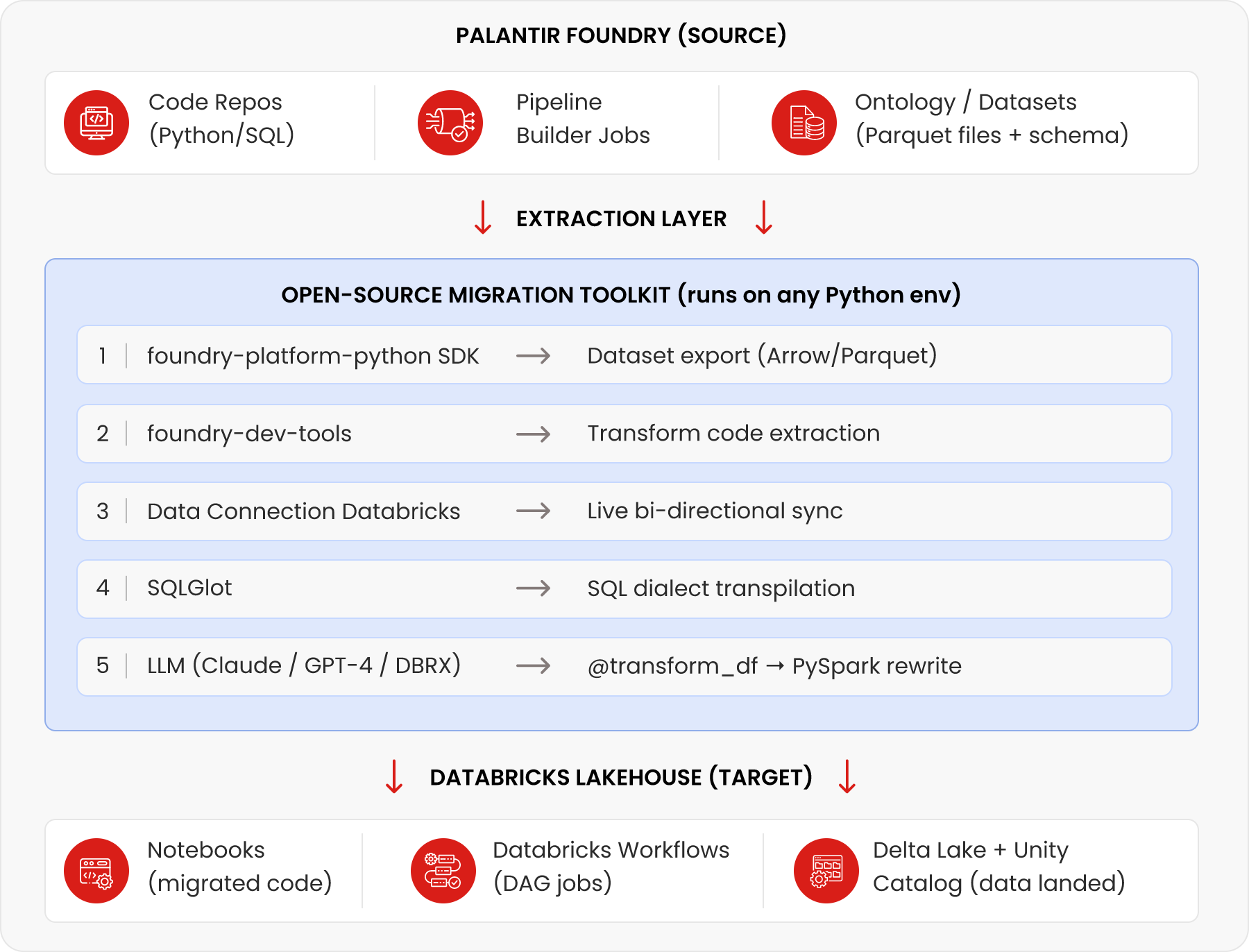
### Key insight
The 'migration toolkit layer' is not a product — it's a Python pipeline you assemble from existing open-source tools. The five tools shown (Palantir SDK, foundry-dev-tools, Data Connection, SQLGlot, and an LLM API) cover 90%+ of migration scenarios.
## 3. How to migrate Datasets: Step-by-step with real code
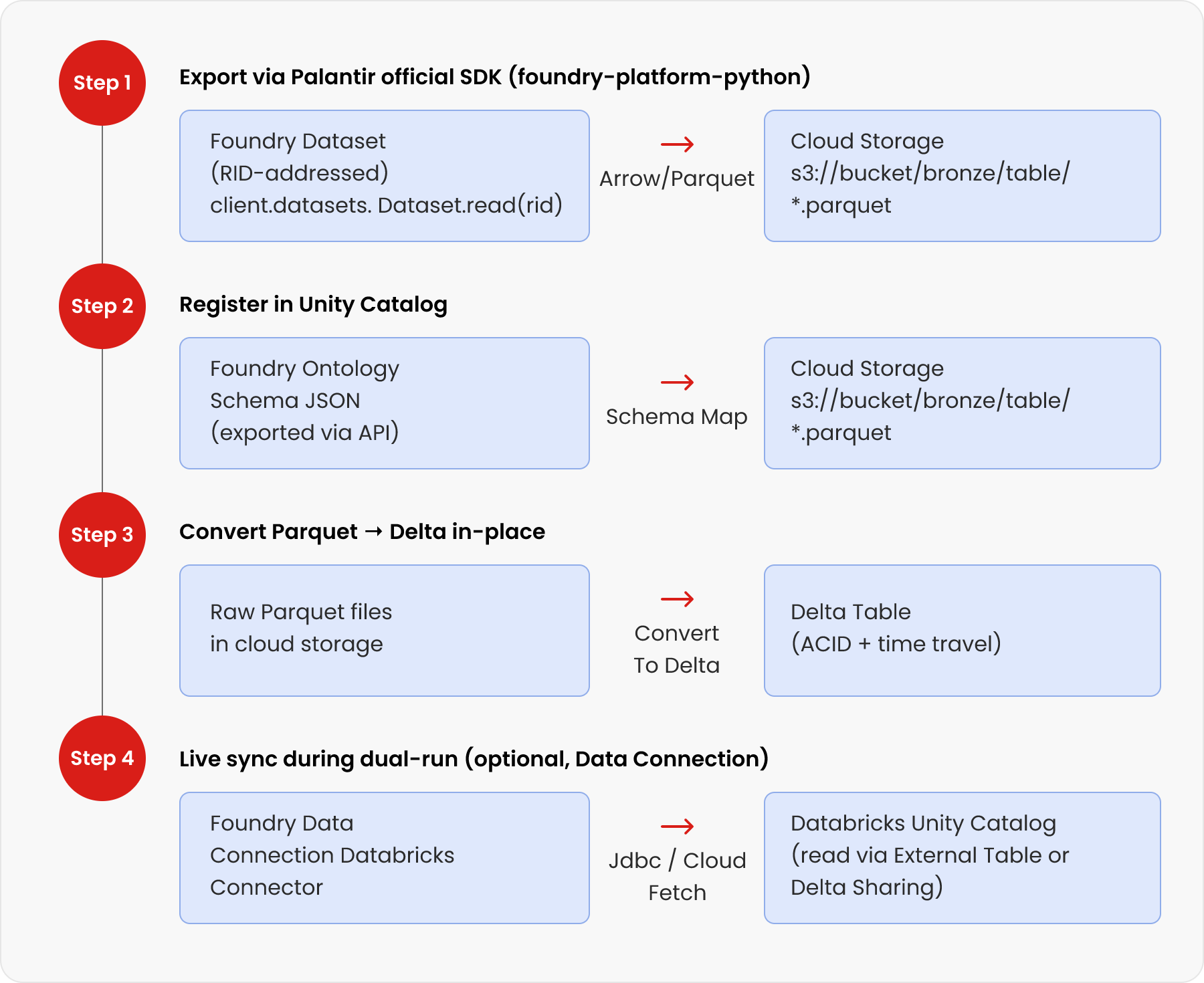
Dataset migration is executed across three key steps: exporting data from Foundry, converting it into Delta format, and enabling live synchronization during transition. This section walks through each stage with the tools and code required to ensure a smooth and scalable migration.
## 3.1. Step 1 — Export Datasets Using the Official Palantir Python SDK
Palantir publishes the official foundry-platform-python SDK on GitHub (palantir/foundry-platform-python). It exposes the Foundry REST API as Python objects. Use it to stream datasets directly to cloud storage.
**
```
# pip install foundry-sdk
from foundry_sdk.v1 import FoundryClient
import foundry_sdk, pyarrow.parquet as pq, boto3, io
client = FoundryClient(
auth=foundry_sdk.UserTokenAuth(token=''),
hostname='yourorg.palantirfoundry.com'
)
# Stream dataset as Arrow (most efficient — no CSV overhead)
dataset_rid = 'ri.foundry.main.dataset.c26f11c8-...'
arrow_stream = client.datasets.Dataset.read(
dataset_rid,
format='ARROW', # Arrow is fastest; also supports CSV
branch_id='master'
)
# Write directly to S3 as Parquet (ready for Delta conversion)
buf = io.BytesIO(arrow_stream)
table = pq.read_table(buf)
pq.write_to_dataset(table, root_path='s3://my-bucket/bronze/my_dataset/')
# For large datasets: paginate using start_transaction_rid / end_transaction_rid
# For schema only: client.datasets.Dataset.get_schema(dataset_rid)
```
### Tip
For bulk exports across 50+ datasets, wrap this in a loop that reads your inventory CSV and parallelises with concurrent.futures.ThreadPoolExecutor. Export throughput is typically 200–800 MB/min depending on network bandwidth and Foundry worker allocation.
## 3.2. Step 2 — Convert Raw Parquet to Delta Lake Format
Once the Parquet files are in cloud storage, convert them to Delta format in-place using a single Databricks command. This preserves all data while adding ACID transactions and time travel.
**
```
-- Run this in a Databricks SQL notebook or as a Workflow task
-- Option A: CONVERT TO DELTA (fastest, in-place, no data copy)
CONVERT TO DELTA parquet.`s3://my-bucket/bronze/my_dataset/`;
-- Option B: Write as Delta directly (when you want to control schema)
-- (Python notebook)
df = spark.read.parquet('s3://my-bucket/bronze/my_dataset/')
df.write.format('delta') \
.mode('overwrite') \
.option('overwriteSchema', 'true') \
.saveAsTable('main.bronze.my_dataset')
-- Register in Unity Catalog after CONVERT TO DELTA
CREATE TABLE IF NOT EXISTS main.bronze.my_dataset
USING DELTA LOCATION 's3://my-bucket/bronze/my_dataset/';
```
## 3.3. Step 3 — Live Sync During Dual-Run (Foundry Data Connection)
Palantir's native Databricks Connector (released in beta May 2024) lets you sync data between Foundry and Databricks bidirectionally during the transition period — so both systems stay in sync without manual re-exports.
Use Case
How to Configure
Read Databricks Unity Catalog tables into Foundry
Open Data Connection → + New Source → Databricks → configure hostname + token
Expose Foundry datasets to Databricks as external tables
Use Virtual Tables feature in the connector (Delta Lake and Iceberg supported)
Parallel validation during dual-run
Run the same query on both systems, compare results via Great Expectations
Network: Cloud Fetch mode
Enable Cloud Fetch in connector config for up to 10x faster extraction via cloud storage bypass
Network: PrivateLink
Required when Foundry and Databricks are on the same CSP region (AWS-AWS or Azure-Azure)
### Warning
The Foundry Databricks Connector opens many parallel connections. If you use an agent proxy, increase maxConnections and coreConnections in agent config to avoid pool exhaustion. See Palantir docs for egress policy setup per cloud provider.
## 4. Migrating Jobs: Extract, rewrite, and re-wire
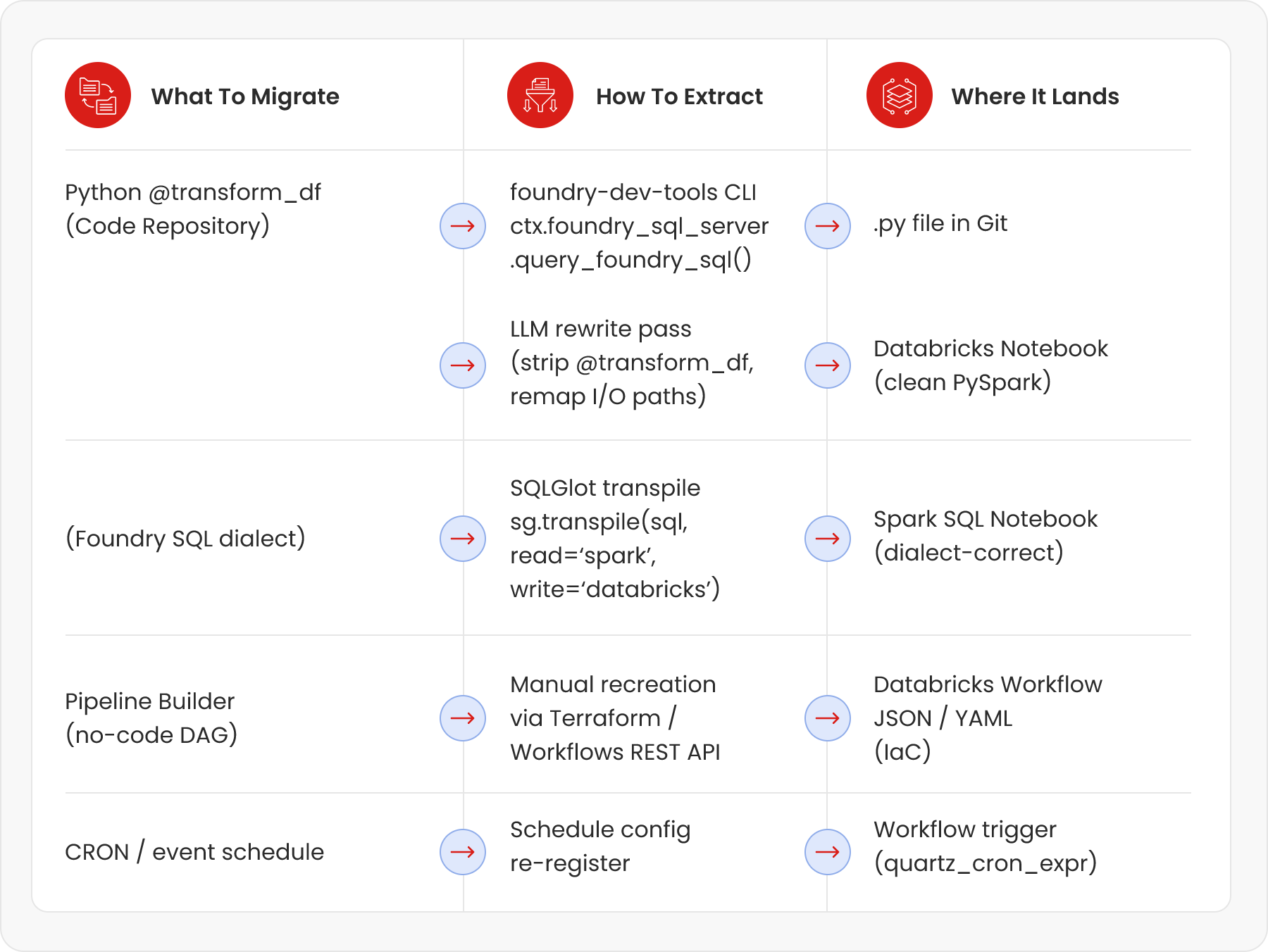
Job migration is the difficult part. Here is the full flow — from extracting code out of Foundry, through automated rewriting, to wiring up the new DAG in Databricks Workflows.
## 4.1. Extract Transform Code with foundry-dev-tools
The open-source foundry-dev-tools library (by Merck's engineering team, emdgroup/foundry-dev-tools on GitHub) provides a Python SDK to pull transform code and run Foundry jobs locally. Use it to extract the raw Python files from Code Repositories.
**
```
# pip install foundry-dev-tools
from foundry_dev_tools import FoundryContext
ctx = FoundryContext() # reads credentials from ~/.foundry/config.toml
# List all datasets in a project (for inventory)
datasets = ctx.foundry_sql_server.query_foundry_sql(
'SELECT * FROM `/path/to/project` WHERE type = \'DATASET\''
)
# Pull a specific dataset as a Spark DataFrame
df = ctx.foundry_sql_server.query_foundry_sql(
'SELECT * FROM `/ri/foundry.main.dataset/your-dataset-rid`'
)
# Export transform source file from a Code Repository branch
# (Use Foundry REST API Code Repositories endpoint for bulk export)
import requests
headers = {'Authorization': f'Bearer {token}'}
resp = requests.get(
f'https://yourorg.palantirfoundry.com/code-repositories/api/repositories/{repo_rid}/contents?branch=master',
headers=headers
)
# Returns list of files — iterate and download each .py transform file
```
## 4.2. Transpile SQL Transforms with SQLGlot (Open Source)
SQLGlot is a zero-dependency open-source Python library that transpiles SQL between 31 dialects including Spark SQL and Databricks SQL. It's the right tool for bulk SQL migration — rules-based (not LLM), so it's deterministic and fast.
**
```
# pip install sqlglot
import sqlglot
import os, pathlib
# Single query example
foundry_sql = """
SELECT date_format(event_ts, 'yyyy-MM') AS month,
approx_count_distinct(user_id) AS unique_users
FROM `/ri/foundry.main.dataset/events-rid`
WHERE event_type = 'CLICK'
GROUP BY 1
"""
databricks_sql = sqlglot.transpile(
foundry_sql,
read='spark', # Foundry uses Spark SQL dialect
write='databricks', # Target: Databricks SQL
pretty=True
)[0]
print(databricks_sql)
# Bulk conversion — process a directory of .sql files
for sql_file in pathlib.Path('./foundry_sql/').glob('**/*.sql'):
src = sql_file.read_text()
out = sqlglot.transpile(src, read='spark', write='databricks', pretty=True)[0]
dest = pathlib.Path('./databricks_sql/') / sql_file.name
dest.write_text(out)
print(f'Converted {sql_file.name}')
```
### SQLGlot vs LLM for SQL
Use SQLGlot for pure SQL dialect differences (functions, date syntax, quoting). Use an LLM for structural logic changes (e.g. converting a MERGE pattern, translating dynamic SQL, or rebuilding a complex window function pattern). SQLGlot is faster, cheaper, and 100% deterministic for syntactic changes.
## 4.3. Rewrite Python Transforms with an LLM (Batch Automation)
Foundry Python transforms use a specific decorator pattern (@transform_df, Input, Output) that Databricks doesn't have. The business logic inside is pure PySpark — it just needs its wrapper stripped and its I/O paths remapped. This is an ideal LLM use case: repetitive, pattern-based code transformation with clear before/after rules.
**
```
# This is what a Foundry Python transform looks like
from transforms.api import transform_df, Input, Output
@transform_df(
Output('/ri/foundry.main.dataset/output-rid'),
raw=Input('/ri/foundry.main.dataset/input-rid'),
)
def compute(raw):
return raw.filter(raw.status == 'ACTIVE') \
.groupBy('region') \
.agg({'revenue': 'sum'})
```
**
```
# After LLM rewrite — clean Databricks PySpark notebook cell
# Input table: main.bronze.input_table
# Output table: main.silver.output_table
from pyspark.sql import functions as F
raw = spark.table('main.bronze.input_table')
result = (
raw.filter(F.col('status') == 'ACTIVE')
.groupBy('region')
.agg(F.sum('revenue').alias('revenue'))
)
result.write.format('delta').mode('overwrite').saveAsTable('main.silver.output_table')
```
## 4.4. The LLM Batch Rewrite Pipeline
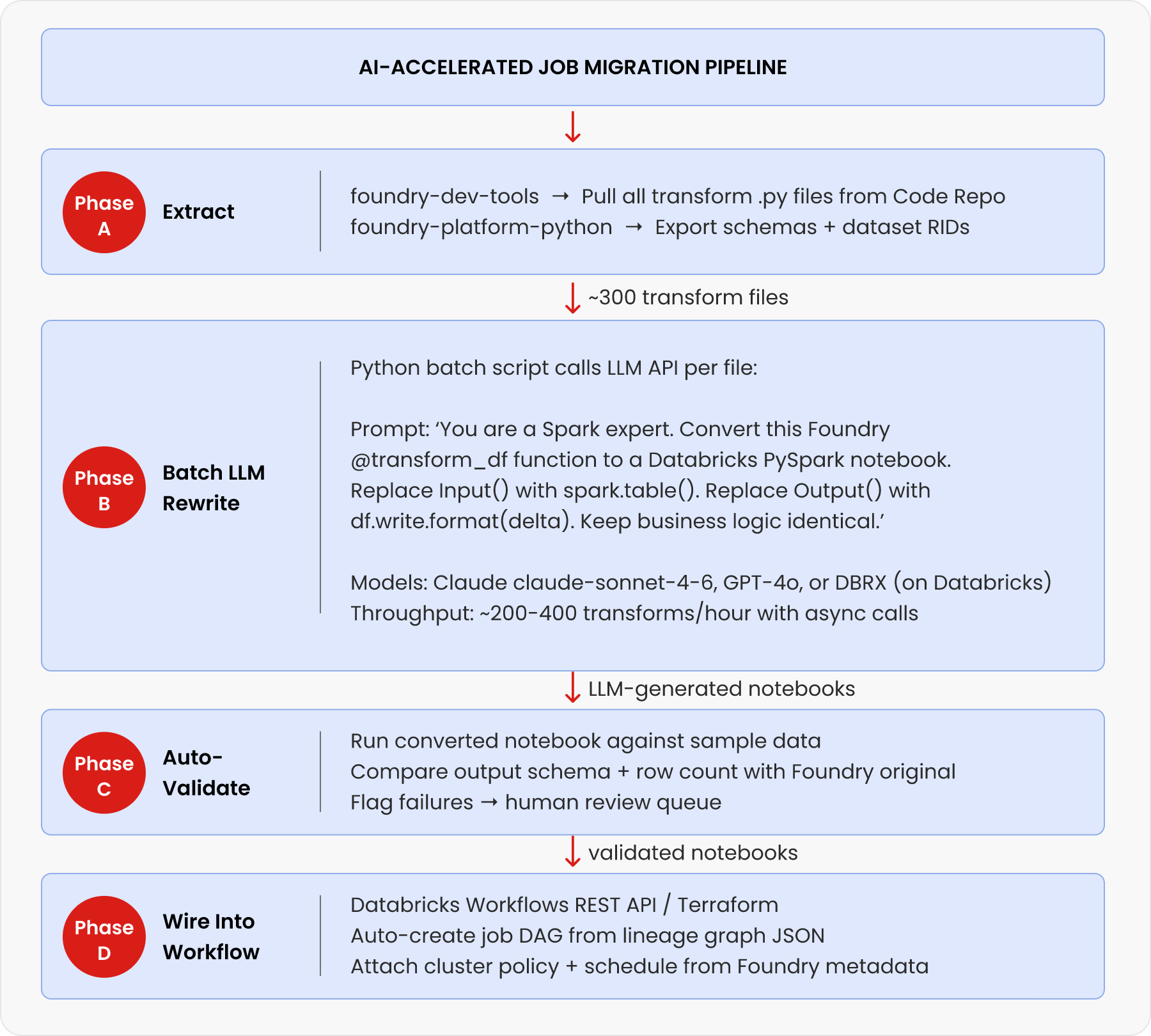
Here is the Python script to automate this across hundreds of transform files using the Claude or OpenAI API. You call this once, get converted notebooks back, then run validation.
**
```
# pip install anthropic (or: openai for GPT-4o, or use Databricks DBRX endpoint)
import anthropic, pathlib, json, concurrent.futures
client = anthropic.Anthropic() # uses ANTHROPIC_API_KEY env var
SYSTEM_PROMPT = '''You are an expert Spark/Databricks data engineer.
Convert the Palantir Foundry Python transform below to a clean Databricks PySpark notebook.
Rules:
1. Remove all imports from transforms.api
2. Remove @transform_df and all decorator arguments
3. Replace Input('/path/to/dataset') with spark.table('') — infer table name from path
4. Replace Output write calls with df.write.format('delta').mode('overwrite').saveAsTable('')
5. Keep ALL business logic (filters, joins, aggregations) identical
6. Return ONLY the Python code, no markdown, no commentary'''
def convert_transform(py_file: pathlib.Path) -> str:
source_code = py_file.read_text()
msg = client.messages.create(
model='claude-sonnet-4-6',
max_tokens=4096,
system=SYSTEM_PROMPT,
messages=[{'role': 'user', 'content': source_code}]
)
return msg.content[0].text
# Batch convert all .py files in the extracted transform directory
transform_files = list(pathlib.Path('./foundry_transforms/').glob('**/*.py'))
print(f'Converting {len(transform_files)} transform files...')
with concurrent.futures.ThreadPoolExecutor(max_workers=10) as executor:
futures = {executor.submit(convert_transform, f): f for f in transform_files}
for future in concurrent.futures.as_completed(futures):
src_file = futures[future]
converted = future.result()
out_path = pathlib.Path('./databricks_notebooks/') / src_file.name
out_path.write_text(converted)
print(f' ✓ {src_file.name}')
# Alternative: use Databricks DBRX endpoint (keeps data in your environment)
# Replace client with: OpenAI(api_key=TOKEN, base_url=DATABRICKS_ENDPOINT)
# Model: 'databricks-meta-llama-3-70b-instruct' or 'databricks-dbrx-instruct'
```
### Throughput benchmark
In practice, with 10 parallel API workers and Claude claude-sonnet-4-6 or GPT-4o, you can convert 200–400 transform files per hour. A typical enterprise Foundry deployment with 200 transforms completes LLM conversion in under 2 hours. Human review of flagged failures typically adds 1–3 days. [Ref 1, Ref 2]
## 4.5. Rebuild the Job DAG in Databricks Workflows
Once notebooks are ready, the dependency graph (who reads from whom) must be re-expressed as a Databricks Workflow DAG. Automate this from the Foundry lineage export.
**
```
# Step 1: Export lineage graph from Foundry REST API
# GET /foundry-catalog/api/datasets/{rid}/lineage
# → returns JSON with upstream_datasets[] and downstream_datasets[]
# Step 2: Build Databricks Workflow JSON from lineage
import json
def build_workflow_from_lineage(lineage_json: dict) -> dict:
tasks = []
for transform in lineage_json['transforms']:
task = {
'task_key': transform['name'].replace('/', '_'),
'notebook_task': {
'notebook_path': f'/Repos/migration/{transform["name"]}',
'base_parameters': {}
},
'existing_cluster_id': 'YOUR_CLUSTER_ID',
'depends_on': [
{'task_key': dep.replace('/', '_')}
for dep in transform.get('upstream_transforms', [])
]
}
tasks.append(task)
return {
'name': 'migrated_pipeline',
'tasks': tasks,
'schedule': {
'quartz_cron_expression': transform.get('cron', '0 0 6 * * ?'),
'timezone_id': 'UTC'
}
}
# Step 3: POST to Databricks Workflows API to create the job
import requests
workflow_json = build_workflow_from_lineage(lineage_data)
resp = requests.post(
'https://.azuredatabricks.net/api/2.1/jobs/create',
headers={'Authorization': f'Bearer {DATABRICKS_TOKEN}'},
json=workflow_json
)
print('Created job id:', resp.json()['job_id'])
```
## 5. Migrating no-code pipelines and ML models
This section covers how no code pipelines and ML models are migrated from Foundry to Databricks, including translating Pipeline Builder workflows into Delta Live Tables and moving models from AIP to MLflow.
## 5.1 Pipeline Builder (No-Code) → Delta Live Tables
Foundry's Pipeline Builder produces no extractable code — the logic is stored as a UI configuration. The equivalent in Databricks is Delta Live Tables (DLT), which uses a declarative SQL or Python syntax.
Pipeline Builder Pattern
Delta Live Tables (DLT) Equivalent
Pipeline Builder aggregate node (group-by + sum)
CREATE OR REFRESH LIVE TABLE gold_revenue AS SELECT region, SUM(revenue) FROM LIVE.silver_orders GROUP BY region
Pipeline Builder filter node (WHERE clause)
CREATE OR REFRESH LIVE TABLE filtered AS SELECT * FROM LIVE.raw WHERE status = 'ACTIVE'
Pipeline Builder join node
CREATE OR REFRESH LIVE TABLE joined AS SELECT a.*, b.name FROM LIVE.orders a JOIN LIVE.customers b ON a.customer_id = b.id
Pipeline Builder incremental input (@incremental)
APPLY CHANGES INTO in DLT — CDC-based incremental processing
Pipeline Builder schedule (daily at 6am)
DLT Pipeline trigger: scheduled, or attach to a Databricks Workflow
### How to migrate no-code jobs
There is no automated tool to convert Pipeline Builder UI config to DLT. The practical approach: (1) screenshot the pipeline graph, (2) use an LLM to generate the DLT SQL from the screenshot description or from the lineage JSON, (3) review and test. A 10-node Pipeline Builder pipeline typically becomes 10-15 lines of DLT SQL.
## 5.2. AIP / ML Models → MLflow Registry
If your Foundry environment uses AIP (Artificial Intelligence Platform), migrate models to Databricks MLflow in three steps:
- Export model artifact: download the model binary and requirements.txt from AIP model registry via Foundry REST API.
- Re-register in MLflow: use mlflow.pyfunc.log_model() to re-register under the same model name.
- Point training pipelines at Delta tables: update any training notebooks to read from main.bronze/silver instead of Foundry dataset paths.
**
```
import mlflow
import mlflow.pyfunc
# Register an exported AIP model artifact into MLflow
mlflow.set_tracking_uri('databricks') # Uses Databricks MLflow
mlflow.set_experiment('/migrations/aip_model_registry')
with mlflow.start_run():
# Log model from local path (exported from AIP)
mlflow.pyfunc.log_model(
artifact_path='model',
python_model=mlflow.pyfunc.load_model('./exported_aip_model/'),
registered_model_name='my_model_name', # same name as in AIP
pip_requirements='./exported_aip_model/requirements.txt'
)
mlflow.log_param('migrated_from', 'Palantir AIP')
print('Model registered in MLflow Model Registry')
```
## 6. How to validate the migration
Every migrated dataset and job must pass three layers of validation before you flip the switch.
Validation Layer
What to Check
How to Automate
Layer 1: Schema
Column names, types, nullable flags match exactly
spark.table('migrated').schema == original_schema_from_foundry
Layer 2: Data volume
Row count and null profile match
SELECT COUNT(*), COUNT(col) GROUP per column — compare Foundry vs Delta
Layer 3: Business logic
Aggregated outputs match (not row-by-row — statistical equivalence)
Compare SUM, AVG, COUNT DISTINCT on key metrics; use Great Expectations for automation
**
```
# Great Expectations for automated data validation
# pip install great_expectations
import great_expectations as gx
context = gx.get_context()
batch = context.sources.add_spark('databricks') \
.add_dataframe_asset('migrated_table') \
.build_batch_request(dataframe=spark.table('main.silver.my_table'))
suite = context.add_expectation_suite('migration_suite')
validator = context.get_validator(batch_request=batch, expectation_suite=suite)
# Assert row count matches Foundry source (store expected count from export step)
validator.expect_table_row_count_to_equal(value=1_234_567)
# Assert no nulls on critical columns
validator.expect_column_values_to_not_be_null('customer_id')
# Assert value ranges are preserved
validator.expect_column_values_to_be_between('revenue', min_value=0, max_value=1e9)
results = validator.validate()
print('Validation passed:', results.success)
```
## 7. Complete open-source tool reference
Tool
Purpose in Migration
Where to Get It
foundry-platform-python
Official Palantir SDK — dataset export, schema fetch, branch history
github.com/palantir/foundry-platform-python
foundry-dev-tools (OSS)
Community SDK — run Foundry transforms locally, extract code
github.com/emdgroup/foundry-dev-tools
Foundry Data Connection
Native Databricks connector for live bidirectional sync
palantir.com/docs/foundry/available-connectors/databricks
SQLGlot
Zero-dependency SQL transpiler — 31 dialects, Spark ↔ Databricks
github.com/tobymao/sqlglot
Claude / GPT-4o / DBRX
LLM for Python transform rewrite (@transform_df → PySpark)
api.anthropic.com / platform.openai.com / databricks DBRX endpoint
Great Expectations
Data validation framework — schema + row count + distribution checks
github.com/great-expectations/great_expectations
Databricks Terraform Provider
Infrastructure-as-code for Workflow DAGs, clusters, Unity Catalog
registry.terraform.io/providers/databricks/databricks
delta-rs / delta-io
Pure-Python Delta Lake library — CONVERT TO DELTA without Spark
github.com/delta-io/delta-rs
pyspark-ai
English SDK for PySpark — LLM-powered DataFrame transforms (experimental)
github.com/pyspark-ai/pyspark-ai
## 8. Realistic timeline with AI acceleration
With the AI-accelerated approach (LLM batch rewrite + automated validation), a medium-sized Foundry deployment (50 datasets, 200 transforms) looks like this:
Timeline
Phase
What Happens
Week 1–2
Assessment & tooling setup
Inventory all datasets + transforms; set up foundry-platform-python + SQLGlot + LLM API; configure Databricks workspace + Unity Catalog
Week 3–4
Automated data export
Run bulk Parquet export via Palantir SDK; CONVERT TO DELTA; register in Unity Catalog; validate Layer 1+2 (schema + row count)
Week 3–4
Automated data export
Run bulk Parquet export via Palantir SDK; CONVERT TO DELTA; register in Unity Catalog; validate Layer 1+2 (schema + row count)
Week 5–6
LLM batch job rewrite
Run batch LLM conversion for all Python transforms (~2 hrs for 200 files); SQLGlot for SQL files; manual reconstruction of Pipeline Builder jobs as DLT
Week 7–8
Validation + DAG rebuild
Run Great Expectations validation suite; auto-generate Databricks Workflow DAGs from lineage JSON; parallel run (dual-write)
Week 9–10
Cutover + decommission
Flip downstream consumers to Databricks; freeze Foundry writes; validate SLAs for 1 week; decommission Foundry jobs
### Without AI acceleration
The same migration without LLM batch rewriting would require a senior data engineer to manually port each transform (1–4 hrs each for 200 transforms = 200–800 engineer-hours = 5–20 person-weeks). With AI-assisted batch conversion, the majority of transforms are done in 2–4 hours of compute time, with engineers reviewing only the flagged failures (typically 15–30% of files). [Ref 1]
## About the Author
Ritwick Pandey is a Databricks Champion and a seasoned Data Engineering professional with over 14 years of experience in building scalable data platforms and driving data-driven solutions. He has extensive expertise across modern data engineering, cloud architectures, and AI-driven projects. With multiple certifications and badges in AWS and Databricks, along with experience across other cloud platforms, he brings a strong blend of technical depth and practical implementation skills. He has worked on diverse enterprise use cases, enabling organizations to design robust data pipelines, leverage advanced analytics, and unlock business value through data and AI.
## References
- Miles Cole — Leveraging LLMs for Accelerated Migrations (Databricks replatform case study) — [Link](https://milescole.dev/data-engineering/2024/05/19/Leveraging-LLMs-for-Accelerated-Migrations.html)
- Miles Cole — SQLGlot: The SQL Decoder Ring for Replatforming to Databricks/Fabric — [Link](https://milescole.dev/data-engineering/2024/04/17/The-SQL-Decoder-Ring-for-Replatforming-to-Fabric-And-Databricks.html)
- Palantir Official Python SDK — foundry-platform-python (GitHub) — [Link](https://github.com/palantir/foundry-platform-python)
- Palantir Foundry — Available Connectors: Databricks (official docs) — [Link](https://www.palantir.com/docs/foundry/available-connectors/databricks)
- foundry-dev-tools (emdgroup OSS) — run Foundry transforms locally — [Link](https://github.com/emdgroup/foundry-dev-tools)
- SQLGlot — Python SQL Parser and Transpiler (GitHub) — [Link](https://github.com/tobymao/sqlglot)
- Databricks — Data Migration Decoded Part 1: Using SQLGlot for Netezza→Databricks — [Link](https://community.databricks.com/t5/technical-blog/data-migration-decoded-part-1-crafting-test-data-for-automated/ba-p/65205)
- Palantir Developer Community — Best approach to migrate pipelines from Palantir to Databricks (live discussion) — [Link](https://community.palantir.com/t/best-approach-to-migrate-data-pipelines-from-palantir-to-databricks/6405)
- Databricks Terraform Provider — databricks_job resource documentation — [Link](https://community.palantir.com/t/best-approach-to-migrate-data-pipelines-from-palantir-to-databricks/6405)
- Great Expectations — Open-source data validation framework — [Link](https://github.com/great-expectations/great_expectations)
- pyspark-ai — English SDK for PySpark (experimental, GPT-4 + LangChain) — [Link](https://github.com/pyspark-ai/pyspark-ai)
---
## Navigation
- [Company](/about-sigmoid)
- [Newsroom](/newsroom)
- [Life at Sigmoid](/careers)
- [Takshashila](/takshashila)
- [Contact Us](/contact-us)
- [AI Strategy Blueprint your AI advantage](/enterprise-ai-strategy/)
- [Generative AI Drive innovation with Generative AI](/generative-ai/)
- [Responsible AI Build trust with ethical AI practices](/responsible-ai-in-enterprise/)
- [Agentic AI Reshape business with scalable agentic systems](/agentic-ai-solutions/)
- [AI Managed Services Ensure reliable AI performance](/ai-managed-services/)
- [Advanced Analytics Transform your business with data-driven insights](/advanced-data-analytics-solutions/)
- [Start Assessment](/agentic-ai-readiness-index/)
- [Data Strategy Strong data foundations for scalable AI](/data-analytics-strategy/)
- [Data Management Leverage data as a strategic asset](/ai-data-management-services/)
- [Data Ops Automate data for speed and quality](/data-devops/)
- [Data Engineering Deliver insights faster with scalable pipelines](/data-engineering/)
- [Cloud Transformation Modernize data to maximise efficiency](/cloud-migration/)
- [Download Whitepaper](/ebooks-whitepapers/building-data-products-in-a-data-mesh-to-drive-business-value/)
- [Data Modeling Structure data for better decisions](/data-modeling-services/)
- [Data Visualization Transform data into actionable stories](/data-visualization-service/)
- [BI Migration Enhance decision making with modern BI tools](/bi-migration/)
- [Data Observability Build trust with healthy, accurate data](/data-observability/)
- [Automated Insights Make smarter decisions with auto-generated insights](/automated-insights/)
- [Download Whitepaper](/ebooks-whitepapers/power-bi-hacks/)
- [CPG & Retail End-to-end analytics for planning, operations, and commercial excellence](/industries/cpg-analytics/)
- [Life Sciences Trusted intelligence across clinical, commercial, and operational workflows](/industries/life-sciences/)
- [Financial Services AI-powered analytics for risk, compliance and customer experience](/industries/banking-financial-analytics-services/)
- [Read case study](/case-studies/data-clean-room-enables-real-time-insights-to-improve-operational-efficiency/)
- [MediaIQ Advanced platform for in-flight marketing measurement](/accelerators/sigmoid-mediaiq-multi-touch-attribution-tool/)
- [CampaignIQ AI-driven platform for optimized campaign budget allocation](/accelerators/sigmoid-campaigniq/)
- [AssistBot GenAI email assistant that automates human-like responses](/accelerators/sigmoid-assistbot-for-ai-email-assistant/)
- [CreativeBot GenAI tool for personalized and brand-aligned creative design](/accelerators/sigmoid-creativebot/)
- [SocialBot GenAI platform to analyze digital conversations and trends](/accelerators/#marketing|socialbot)
- [DemandIQ Predict trends accurately and optimize inventory management](/accelerators/sigmoid-demandiq/)
- [NetworkIQ Track and optimize logistics operations in real-time to quickly address disruptions](/accelerators/sigmoid-networkiq/)
- [SupplyIQ End-to-end platform to optimize supply chain operations](/accelerators/sigmoid-supplyiq/)
- [ProcurementIQ Automated procurement operations for maximum savings, compliance and efficiency](/accelerators/sigmoid-procurementiq/)
- [RapidML Accelerated deployment for machine learning models](/accelerators/sigmoid-rapidml/)
- [DataGuard Comprehensive platform for proactive data quality management](/accelerators/data-quality-tool-sigmoid-dataguard/)
- [CloudPulse Cloud cost optimization platform with multi-cloud management](/accelerators/sigmoid-cloudpulse/)
- [RAPID GenAI foundation with built-in governance and cost clarity](/accelerators/sigmoid-rapid/)
- [AnalyticsBot GenAI based platform to streamline decision-making in analytics](/accelerators/sigmoid-analyticsbot/)
- [DataConnect Seamlessly ingest, integrate and harmonize data from diverse sources](/accelerators/sigmoid-dataconnect/)
- [Reconica AI-powered data harmonization and reconciliation engine](/accelerators/sigmoid-reconica/)
- [ConverseBot GenAI driven insights generation for automated insights from reports](/accelerators/#sales|conversebot)
- [iNRM Cross-lever revenue growth optimization platform](/accelerators/sigmoid-inrm/)
- [AssortmentIQ Optimize shelf layouts and assortment mix at scale with AI-based insights](/accelerators/sigmoid-assortmentiq/)
- [Read Whitepaper](/ebooks-whitepapers/building-agentic-ai-chatbots-for-business-process-transformation/)
- [Listen Podcast](/events/podcast/how-jack-in-the-box-is-redefining-personalization-and-supply-chain-with-ai/)
- [Blogs](/blogs/)
- [White Papers](/ebooks-whitepapers/)
- [Case Studies](/case-studies/)
- [Podcast](/events/podcast/#Podcasts)
- [Read Blog](/blogs/the-genai-adoption-triad-responsibility-ethics-and-explainability/)
- [ConverseBot](/accelerators/#sales|conversebot/)
---
## Footer Links
- [Talk to our AI experts](/contact-us/)
- [AI Strategy](/enterprise-ai-strategy/)
- [Agentic AI](/agentic-ai-solutions/)
- [Generative AI](/generative-ai/)
- [AI Managed Services](/ai-managed-services/)
- [Responsible AI](/responsible-ai-in-enterprise/)
- [Advanced Analytics](/advanced-data-analytics-solutions/)
- [Data Strategy](/data-analytics-strategy//)
- [Data Engineering](/data-engineering/)
- [Data Management](/ai-data-management-services/)
- [Cloud Transformation](/cloud-transformation/)
- [Data Ops](/data-devops/)
- [Data Visualization](/data-visualization-service/)
- [Automated Insights](/automated-insights/)
- [BI Migration](/bi-migration/)
- [Data Modeling](/data-modeling-services/)
- [Data Observability](/data-observability/)
- [CPG & Retail](/industries/cpg-analytics/)
- [Financial Services](/industries/banking-financial-analytics-services/)
- [Life Sciences](/industries/life-sciences/)
- [Case Studies](/case-studies/)
- [Thought Leadership](/ebooks-whitepapers/)
- [Blogs](/blogs/)
- [Company](/about-sigmoid/)
- [Newsroom](/newsroom/)
- [Accelerators](/accelerators/)
- [Careers](/careers/)
- [Privacy Policy |](/privacy-policy/)
- [Cookie Policy](/cookie-policy/)